![logo big.png]](https://help.togal.ai/hs-fs/hubfs/logo%20big.png?height=50&name=logo%20big.png)
Available on: A paid Togal.AI subscription
Ideal for: projects like hotels, hospitals and apartments that need repeating layouts
Before Creating a Repeating Group
-
Open a drawing
-
First, perform a detailed takeoff on an enlarged plan of a typical repeating unit
-
This will turn into a count
Tip: Make sure your initial takeoff is on the most detailed enlarged plan to ensure accuracy.
Create a Repeating Group
-
Click + in the right panel to create classification
-
Click on Create Repeating group (still in BETA)
-
Give it a descriptive name like "Studio King Unit", add ID and select folder and an optional note
-
Click Save to save your new group and proceed
Tip: Be specific in naming your groups so it can be differentiated from typical layouts in that project.
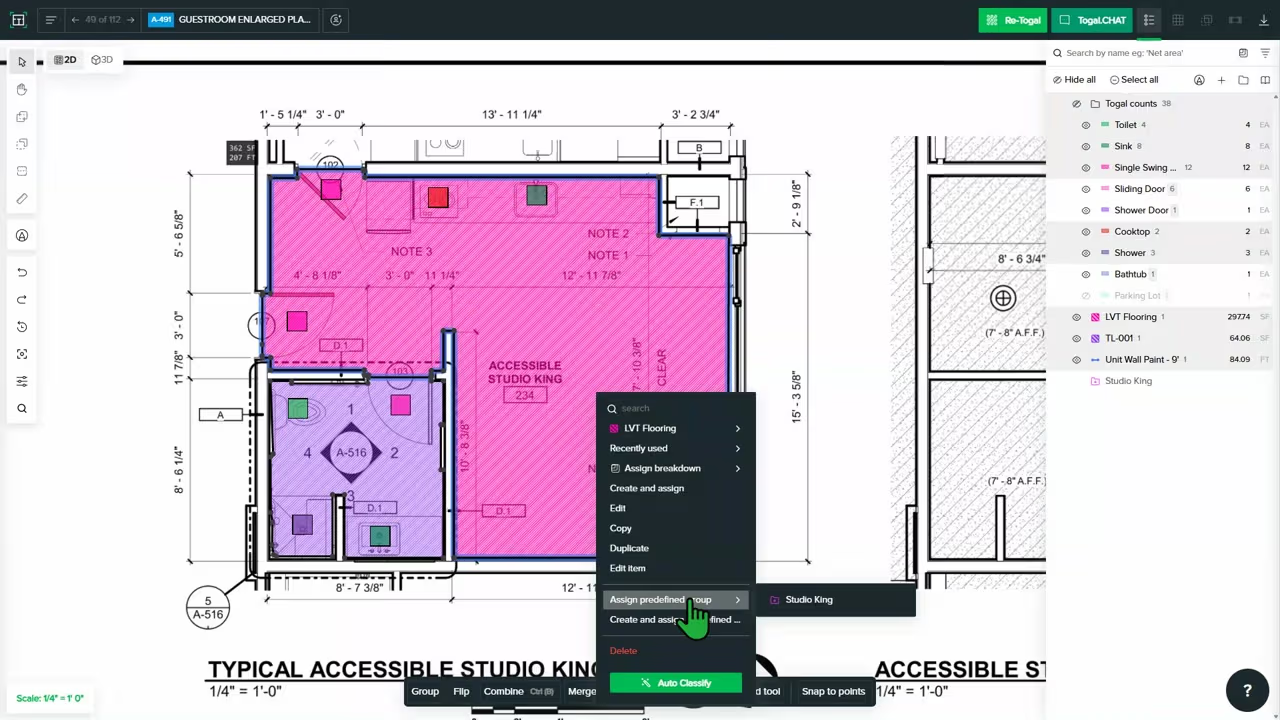
- On canvas, select all the takeoff items you measured for the typical unit
- Right-click and choose the Assign Repeating Group, then select the group you just created
- Navigate to a main floor plan where these units appear
- Select the new Repeating Group from the classifications panel on the right. The cursor will now show a preview of the entire takeoff group
- Click on each location where the typical unit exists. Each click places an instance of the group and automatically multiplies the quantities for every takeoff item within it
Key capabilities
Accelerate Takeoffs: Drastically reduce the time spent on projects with dozens or hundreds of repeating rooms (sometimes across multiple floors and units).
Ensure Consistency: Eliminates minor discrepancies by applying the exact detailed takeoff to every identical unit.
Simplify Complex Units: Group together all materials for a single unit such as flooring, paint, baseboards, fixtures into one manageable object.
Aggregate Quantities Automatically: Watch the total project quantities update in real-time with every group created, thus reducing the need for manual calculations per unit added.
Tip: Use the Togal AI search to type, search and locate as many identical units with the same count name in the drawing.
With search, you can convert all searches found into the Repeating Group count name to perform a unit takeoff on the remaining identical units.
Note: You can only edit (add, delete, modify) take-off inside the ‘master unit’, and repeating instances will reflect all the changes.