![logo big.png]](https://help.togal.ai/hs-fs/hubfs/logo%20big.png?height=50&name=logo%20big.png)
Automatic snapping is a feature that helps you align and draw lines or polygons precisely by automatically "snapping" them to specific angles or nearby elements, such as other lines or shapes.
When automatic snapping is enabled in Togal, it helps you draw lines and polygons at defined angle or length increments from each other. Snapping works with the following combinations:
- Line to a polygon
- Polygon to a line
- Line to another line
- Dimension line to a polygon or line
To enable automatic snapping
- Select an area or linear classification. The panel below will appear at the bottom of your screen

- Click "Automatic snapping" and choose whether to "Snap to angle" or "Snap to distance". Set the angle using the the arrows, or type inthe distance.e
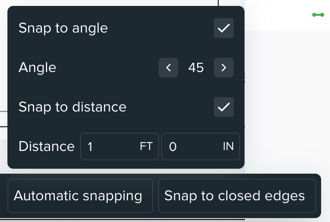
When "Automatic Snapping" is turned on, you can press the Shift key to temporarily disable snapping and draw freeform lines.